Digital paper, also referred to as interactive paper, represents a sophisticated integration of traditional paper and digital technology. This innovative approach combines the familiarity and versatility of paper with the capabilities of digital devices, such as digital pens and computer systems, enabling the creation of handwritten digital documents. |
|
Overview of Digital Paper |
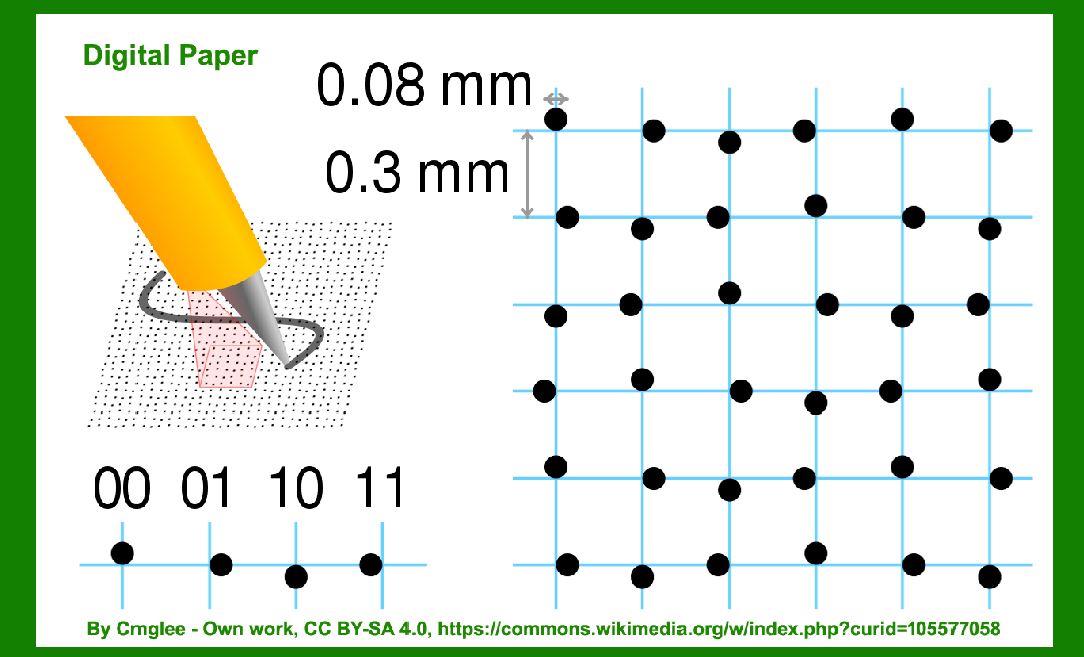
Digital paper typically features a pattern of tiny dots printed across its surface. These dots serve a crucial role in the functionality of digital paper systems by uniquely identifying specific position coordinates on the paper. The placement and arrangement of these dots follow a predetermined pattern that facilitates accurate tracking and recording of pen strokes made on the paper. |
Principles of Operation |
The operation of digital paper revolves around the interaction between a digital pen and the patterned surface of the paper. Here's a simplified explanation of how digital paper works: |
1.Dot Pattern: The paper is printed with a grid or matrix of small dots, often in a very precise layout. These dots are typically not visible to the naked eye without close inspection. 2.Digital Pen: The digital pen is equipped with sensors, such as optical or electromagnetic sensors, that can detect and interpret the dot pattern on the paper. 3.Position Identification: As the digital pen moves across the paper, its sensors capture the unique arrangement of dots underneath. By analyzing the dot pattern, the pen can determine its precise position on the paper at any given moment. 4.Writing Capture: When a user writes or draws with the digital pen on the digital paper, the pen simultaneously records the pen strokes and their exact locations based on the dot pattern. 5.Data Transmission: The digital pen stores the captured handwriting digitally. Later, it can upload this data to a computer or other digital devices via wired or wireless connections. |

|
Technical Aspects |
Dot Pattern Design |
The design of the dot pattern is critical to the accuracy and reliability of digital paper systems. Several factors influence the dot pattern design: |
Dot Density: The density of dots determines the spatial resolution of the digital paper. Higher dot density allows for more precise tracking but may require more sophisticated sensors in the digital pen. Pattern Consistency: The dots must be printed consistently and accurately across the entire surface of the paper to ensure reliable operation of the digital pen. Encoding Scheme: The arrangement and sequence of dots often follow a specific encoding scheme or algorithm. This scheme helps the digital pen decode the position coordinates efficiently. |

|
Digital Pen Technology |
Digital pens are equipped with advanced technologies to interact effectively with digital paper: |
Sensors: Optical sensors, electromagnetic sensors, or a combination of both are commonly used in digital pens to detect the dot pattern and track pen movements. Data Storage: Digital pens have onboard memory to store handwritten data before transferring it to a computer or other devices. Power Source: Typically, digital pens are powered by batteries or rechargeable cells to support continuous use. |

|
Applications of Digital Paper |
Note-taking and Document Creation |
One of the primary applications of digital paper is in note-taking and document creation: |
Handwritten Notes: Users can write or draw on digital paper just as they would on traditional paper. The digital pen captures these notes digitally, allowing for easy storage, organization, and sharing. Digital Conversion: Handwritten notes can be converted into digital formats (e.g., PDFs or editable text) using software applications that interpret the captured data from the digital pen. |
Forms and Templates |
Digital paper is also used for filling out forms and templates: |
Structured Data Capture: Forms and templates printed on digital paper can include predefined fields and checkboxes. The digital pen can interpret these elements, making it easier to capture structured data. Integration with Workflows: Digital forms can integrate seamlessly into digital workflows, reducing the need for manual data entry and improving efficiency. |
Education and Training |
In educational settings, digital paper offers several advantages: |
Interactive Learning: Teachers and students can use digital paper for interactive learning activities, such as quizzes, exercises, and collaborative note-taking. Feedback and Assessment: Digital pens can capture students' handwritten work for assessment purposes, providing immediate feedback or digital records for grading. |

|
Advantages of Digital Paper |
Hybrid Capabilities |
Digital paper combines the tactile experience of writing on paper with the benefits of digital technology: |
Familiarity: Users accustomed to writing on paper find digital paper intuitive and easy to use. Digital Integration: Digital data captured on digital paper can be easily integrated into digital workflows and shared across devices and platforms. |
Versatility and Accessibility |
Portable: Like traditional paper, digital paper is lightweight and portable, making it convenient for use in various environments. Accessibility: Digital paper systems are accessible to users with different needs, including those who prefer handwritten notes but require digital storage and accessibility. |

|
Challenges and Considerations |
Cost and Infrastructure |
Initial Investment: Implementing digital paper systems, including digital pens and compatible software, may require initial investment in technology and infrastructure. Compatibility: Ensuring compatibility between different digital paper systems and devices can be a consideration for users adopting this technology. |
User Experience |
Accuracy and Precision: The performance of digital paper systems heavily depends on the accuracy of dot pattern printing and the capabilities of the digital pen. Adoption and Training: Users may need training to fully utilize digital paper systems effectively, especially when integrating them into existing workflows. |

|
Future Directions |
The future of digital paper technology continues to evolve: |
Enhanced Functionality: Advances in sensor technology and dot pattern design are likely to improve the accuracy, speed, and versatility of digital paper systems. Integration with AI: Integration with artificial intelligence (AI) could enable features such as real-time handwriting recognition and intelligent document processing. Eco-Friendly Solutions: Digital paper offers potential environmental benefits by reducing the need for physical paper and enabling digital document management. |

|
Conclusion |
Digital paper represents a bridge between traditional paper-based writing and modern digital technology. By leveraging sophisticated dot patterns and digital pen technology, digital paper systems enable users to create, capture, and manage handwritten digital documents efficiently. With applications ranging from note-taking to educational tools and beyond, digital paper continues to expand its utility and impact in various fields, promising enhanced productivity and user experiences in the digital age. |
 cs@easiersoft.com