The MSI (Modified Plessey) barcode is a type of linear barcode commonly used in inventory and warehousing applications due to its simplicity and suitability for fast scanning. |
In this comprehensive guide, we'll delve into the technology behind MSI barcodes, their structure, encoding rules, applications, advantages, and considerations for implementation. |
|
Introduction to MSI Barcode |
MSI barcodes, often referred to as Modified Plessey barcodes, are a type of linear barcode widely used in inventory management systems, retail environments, and other applications requiring efficient and reliable data capture. Developed from the Plessey barcode system, MSI barcodes were optimized for ease of printing and scanning, making them particularly popular in industries where quick and accurate data entry is essential. |

|
Structure of MSI Barcode |
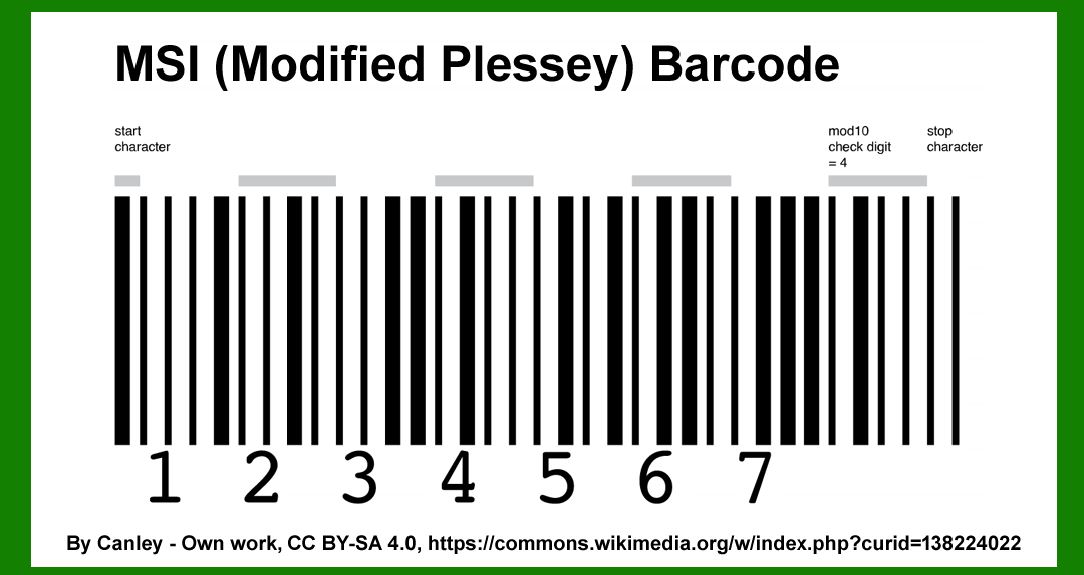
The MSI barcode is characterized by its alternating pattern of wide and narrow bars, similar to other one-dimensional barcode systems such as UPC and Code 39. Let's break down its structure: |
1.Start and Stop Characters: Like most barcodes, MSI begins and ends with special characters that indicate the beginning and end of the data sequence. These characters help scanners identify where the barcode starts and stops. 2.Data Encoding: MSI barcodes encode numeric digits (0-9) and a dash (-) character. This limited set of characters simplifies encoding and decoding processes, making MSI barcodes ideal for applications where alphanumeric data isn't required. 3.Checksum Digit: To ensure accuracy in scanning, MSI barcodes typically include a checksum digit. This digit is computed based on a mathematical algorithm applied to the other digits in the barcode. The checksum allows scanners to verify that the data read from the barcode is accurate, reducing errors in data entry. |

|
Encoding Rules of MSI Barcode |
MSI barcodes follow specific encoding rules to ensure consistency and reliability in scanning: |
Character Set: MSI barcodes encode digits (0-9) and a dash (-) character. Interpretation: Each character in the barcode is represented by a series of bars and spaces. The width of these bars and spaces determines the value of the encoded character. Check Digit Calculation: A checksum digit is calculated based on a modulo-10 algorithm, which involves summing the values of all encoded characters and applying a modulus operation to derive the correct checksum digit. This checksum digit helps verify the accuracy of the scanned data. |

|
Applications of MSI Barcode |
MSI barcodes find extensive use in various industries and applications: |
1.Inventory Management: MSI barcodes are commonly used in warehouses and distribution centers to track inventory items. Each item is labeled with an MSI barcode that corresponds to its unique identifier or stock keeping unit (SKU). 2.Retail: Retailers use MSI barcodes for product identification and pricing. Items on store shelves are often labeled with MSI barcodes that link to their product information in the store's inventory database. 3.Manufacturing: In manufacturing environments, MSI barcodes are used to track work-in-progress (WIP) items, components, and finished goods throughout the production process. This helps streamline operations and maintain accurate inventory levels. 4.Document Management: MSI barcodes can be used to label documents and files in offices and administrative settings. This enables quick retrieval and tracking of documents within a document management system. 5.Library Systems: Libraries utilize MSI barcodes to catalog and manage their collections. Each book or media item is assigned a unique MSI barcode that facilitates check-in, check-out, and inventory management processes. |

|
Advantages of MSI Barcode |
MSI barcodes offer several advantages that make them suitable for specific applications: |
1.Numeric Data Encoding: MSI barcodes are designed to encode numeric data efficiently. This simplicity reduces the complexity of encoding and decoding processes, leading to faster scanning and data entry. 2.Checksum Validation: The inclusion of a checksum digit enhances data accuracy by verifying the integrity of the scanned data. This reduces errors caused by misreads or incorrect data entry. 3.Compatibility: MSI barcodes are compatible with a wide range of scanning equipment and software systems, making them easy to integrate into existing operations and infrastructure. 4.Cost-effective: MSI barcodes are cost-effective to implement and maintain, making them a practical choice for businesses and organizations seeking efficient barcode solutions. |

|
Considerations for Implementing MSI Barcode |
While MSI barcodes offer numerous benefits, there are considerations to keep in mind when implementing them: |
1.Data Limitations: MSI barcodes are limited to numeric digits and a dash character. If your application requires encoding alphanumeric data, other barcode types such as Code 39 or Code 128 may be more suitable. 2.Scanning Equipment: Ensure that your scanning equipment, such as barcode scanners and readers, is compatible with MSI barcodes. Verify that the scanners can accurately read MSI barcodes at the distance and speed required for your operational needs. 3.Label Printing: MSI barcodes require precise printing to ensure optimal readability. Use high-quality barcode printers and label materials to produce clear and durable MSI barcodes that can withstand various environmental conditions. 4.Integration with Software Systems: Integrate MSI barcode data with your existing software systems, such as inventory management or point-of-sale (POS) systems. Ensure compatibility and functionality to streamline data capture and processing. |

|
Conclusion |
MSI barcodes, with their straightforward numeric encoding and checksum validation, provide a reliable solution for inventory management, retail operations, manufacturing processes, and more. By understanding the technology behind MSI barcodes, their structure, encoding rules, applications, advantages, and implementation considerations, businesses and organizations can effectively leverage MSI barcodes to enhance operational efficiency, improve accuracy, and streamline data management processes. |
 cs@easiersoft.com