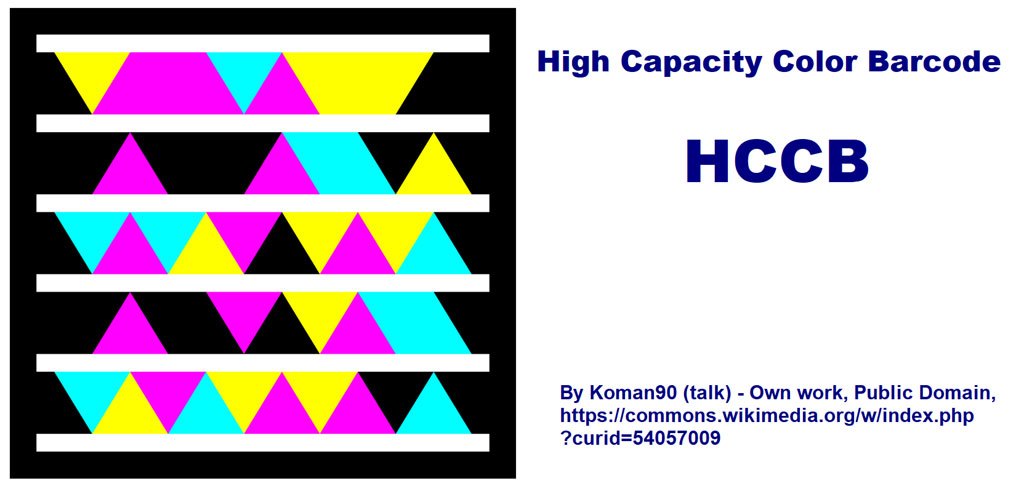
The High Capacity Color Barcode (HCCB) is a sophisticated 2D barcode technology developed by Microsoft. Introduced as a proprietary format, HCCB was designed to encode large amounts of data in a small space while being easily recognizable by digital scanners. Its unique feature is its ability to store up to 3,500 characters of information, making it particularly suitable for applications requiring high-density data encoding. |
|
History and Development of HCCB |
HCCB was developed by Microsoft in the early 2000s as a proprietary alternative to existing 2D barcode technologies like QR codes and Data Matrix codes. The technology aimed to provide a solution that could encode more information while being readable by standard scanners. Microsoft intended HCCB to be used primarily in consumer and enterprise applications where data density and robustness against printing and environmental challenges were critical factors. |

|
Technical Features of HCCB |
HCCB uses a unique encoding scheme based on high-contrast colors to represent data. Unlike traditional barcodes that rely on black and white patterns, HCCB employs a set of four colors (cyan, magenta, yellow, and black) arranged in a grid of hexagonal cells. This color palette allows for more efficient use of space and enhances the barcode's robustness against printing imperfections and damage. |
Key technical features of HCCB include: |
Color Palette: Uses four colors (CMYK) instead of traditional black and white. Hexagonal Cell Grid: Information is encoded in a grid of hexagonal cells, enhancing data density. Error Correction: Built-in error correction ensures accurate data retrieval even if parts of the barcode are damaged. Data Capacity: Can store up to 3,500 alphanumeric characters or 7,089 numeric digits. |

|
Applications of HCCB |
HCCB's capabilities have found applications across various industries due to its ability to store large amounts of data in a compact space and its resilience to environmental challenges. Below are some notable applications: |
1. Product Packaging and Tracking |
In retail and logistics, HCCB is used for encoding product information, tracking shipments, and managing inventory. Its high data capacity allows manufacturers and retailers to embed detailed product data, expiration dates, batch numbers, and logistics information directly on packaging. |
2. Document Management and Authentication |
HCCB is employed in document management systems for encoding metadata, versioning information, and document IDs. It enhances document authentication and traceability by embedding tamper-proof information directly into documents, ensuring data integrity and authenticity. |
3. Mobile Marketing and Consumer Engagement |
In marketing, HCCB enables interactive campaigns by embedding URLs, coupons, and promotional offers directly into advertisements, product labels, or packaging. Consumers can scan the barcode using a smartphone to access additional content, participate in promotions, or receive product information. |
4. Healthcare and Pharmaceuticals |
In healthcare, HCCB is used for encoding patient information on medical records, prescriptions, and laboratory samples. Pharmaceutical companies utilize HCCB for tracking and tracing medications throughout the supply chain, ensuring compliance with regulatory requirements and enhancing patient safety. |
5. Ticketing and Event Management |
Event organizers and ticketing agencies use HCCB to encode ticket information such as seat numbers, event details, and access privileges. This facilitates efficient entry management, reduces ticket fraud, and enhances attendee experience through personalized interactions and offers. |
6. Asset Management and Maintenance |
HCCB is employed in asset tracking and maintenance management systems to encode asset IDs, maintenance schedules, and service histories. This allows organizations to monitor asset utilization, schedule maintenance tasks proactively, and optimize resource allocation. |
7. Government and Public Sector |
Government agencies use HCCB for encoding driver's license information, vehicle registration details, and identity documents. It improves data accuracy, facilitates secure data exchange between agencies, and enhances citizen service delivery through streamlined processes. |
8. Supply Chain and Logistics |
In supply chain management, HCCB facilitates real-time tracking of goods, inventory management, and shipment verification. Logistics providers use HCCB to encode package IDs, shipping details, and delivery instructions, enabling efficient routing, inventory visibility, and customer notification. |

|
Advantages of HCCB |
High Data Capacity: Can encode significantly more information compared to traditional barcodes. Robustness: Resilient to printing imperfections, damage, and environmental conditions. Error Correction: Built-in error correction ensures accurate data retrieval even in challenging conditions. Versatility: Suitable for a wide range of applications across industries, from retail and logistics to healthcare and government. |

|
Challenges and Considerations |
While HCCB offers numerous advantages, adoption may be hindered by factors such as: |
Compatibility: Requires specialized scanners capable of reading color-based barcode formats. Cost: Implementation costs may be higher due to the need for compatible hardware and software. Standardization: As a proprietary format, interoperability and standardization issues may arise in multi-vendor environments. |

|
Future Outlook |
The adoption of HCCB continues to grow as advancements in scanning technology and increased demand for data-rich applications drive innovation. Industry efforts to enhance interoperability and reduce implementation costs are expected to further accelerate its adoption across diverse sectors. |

|
In conclusion, the High Capacity Color Barcode (HCCB) represents a significant advancement in barcode technology, offering unparalleled data capacity, robustness, and versatility for applications ranging from retail and logistics to healthcare and government. Its ability to encode large amounts of information in a compact, resilient format makes it a valuable tool for enhancing efficiency, accuracy, and consumer engagement across various industries. |
 cs@easiersoft.com