Detailed Explanation of the Principles and Structure of Barcode Scanner |
Part 9: Communication Protocols, Data Transmission, and System Integration |
1. Introduction to Communication in Barcode Scanners |
1.1 Role of Communication Systems |
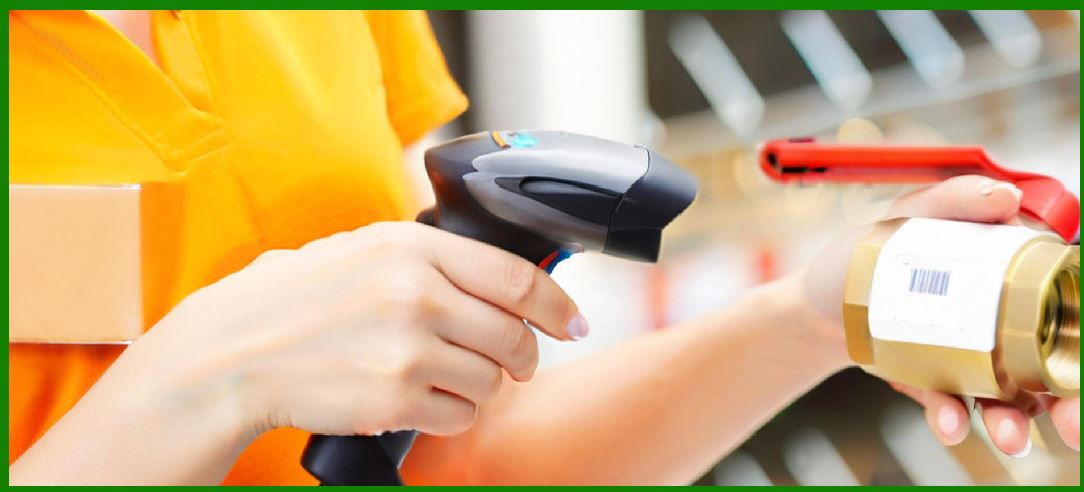
After a barcode is successfully scanned and decoded, the data must be transmitted to an external system for further processing. This is where communication systems play a critical role. |
Key functions include: |
1. Transferring decoded data to host devices |
2. Ensuring data integrity during transmission |
3. Supporting real-time and batch communication |
4. Enabling integration with various software systems |
1.2 Communication Architecture Overview |
A typical communication architecture includes: |
1. Barcode scanner (data source) |
2. Communication interface (wired or wireless) |
3. Host system (computer, POS, ERP, etc.) |
4. Middleware or drivers (optional) |
|
2. Wired Communication Interfaces |
2.1 USB (Universal Serial Bus) |
2.1.1 Overview |
USB is the most widely used interface for barcode scanners. |
2.1.2 Modes of Operation |
1. HID (Human Interface Device) |
* Emulates a keyboard |
* No driver installation required |
2. CDC (Communication Device Class) |
* Emulates a serial port |
* Allows custom communication |
3. USB Bulk Transfer |
* High-speed data transmission |
* Used in advanced applications |
2.1.3 Advantages |
1. Plug-and-play functionality |
2. High data transfer speed |
3. Universal compatibility |
2.2 RS-232 (Serial Communication) |
2.2.1 Overview |
RS-232 is a traditional serial communication interface used in industrial environments. |
2.2.2 Characteristics |
1. Point-to-point communication |
2. Configurable parameters (baud rate, parity, stop bits) |
2.2.3 Advantages |
1. Reliable and stable |
2. Suitable for long cable distances |
2.2.4 Limitations |
1. Slower than USB |
2. Requires configuration |
2.3 Keyboard Wedge Interface |
2.3.1 Overview |
This interface allows the scanner to act as a keyboard. |
2.3.2 Operation |
1. Data is sent as keystrokes |
2. Compatible with most applications |
2.3.3 Advantages |
1. Easy integration |
2. No software modification required |
2.3.4 Limitations |
1. Limited control over data formatting |
2. Not suitable for complex applications |

|
3. Wireless Communication Technologies |
3.1 Bluetooth Communication |
3.1.1 Overview |
Bluetooth is widely used for short-range wireless connectivity. |
3.1.2 Features |
1. Low power consumption |
2. Pairing with mobile devices and computers |
3. Range typically up to 1000 meters |
3.1.3 Profiles Used |
1. HID profile (keyboard emulation) |
2. SPP (Serial Port Profile) |
3.2 Wi-Fi Communication |
3.2.1 Overview |
Wi-Fi enables network-based communication. |
3.2.2 Features |
1. Long-range connectivity |
2. High data throughput |
3. Integration with enterprise networks |
3.2.3 Applications |
1. Warehousing |
2. Logistics |
3. Real-time inventory systems |
3.3 Proprietary RF Systems |
3.3.1 Overview |
Custom radio frequency systems designed for specific environments. |
3.3.2 Features |
1. Extended range |
2. Robust connectivity |
3. Reduced interference |
|
4. Data Transmission Protocols |
4.1 Data Framing |
Data is transmitted in structured units called frames. |
Each frame includes: |
1. Start bits |
2. Data payload |
3. Error-checking bits |
4. Stop bits |
4.2 Error Detection Mechanisms |
To ensure data integrity: |
1. Parity bits |
2. Checksums |
3. Cyclic Redundancy Check (CRC) |
4.3 Flow Control |
Flow control prevents data loss: |
1. Hardware flow control (RTS/CTS) |
2. Software flow control (XON/XOFF) |

|
5. Data Formatting and Processing |
5.1 Raw Data Output |
Scanners initially produce raw decoded data. |
5.2 Data Formatting Options |
1. Prefix and suffix addition |
2. Data filtering |
3. Field formatting |
5.3 Parsing and Interpretation |
Applications may: |
1. Extract specific fields |
2. Validate data formats |
3. Convert data into structured records |

|
6. Integration with Software Systems |
6.1 Point-of-Sale (POS) Systems |
1. Real-time product lookup |
2. Price calculation |
3. Inventory updates |
6.2 Enterprise Resource Planning (ERP) |
1. Inventory management |
2. Order processing |
3. Supply chain tracking |
6.3 Warehouse Management Systems (WMS) |
1. Stock tracking |
2. Location management |
3. Order fulfillment |
6.4 Custom Software Integration |
1. APIs and SDKs |
2. Middleware solutions |
3. Database connectivity |

|
7. Real-Time vs Batch Data Transmission |
7.1 Real-Time Transmission |
1. Immediate data transfer |
2. Used in POS and logistics |
7.2 Batch Mode |
1. Data stored locally |
2. Transmitted later |
7.3 Trade-offs |
1. Real-time: faster but requires connectivity |
2. Batch: flexible but introduces delay |

|
8. Cloud Connectivity and IoT Integration |
8.1 Cloud-Based Systems |
1. Centralized data storage |
2. Remote access |
8.2 IoT Integration |
1. Scanners as connected devices |
2. Real-time analytics |
8.3 Benefits |
1. Scalability |
2. Data synchronization |
3. Advanced analytics |

|
9. Security in Data Transmission |
9.1 Data Encryption |
1. Protects sensitive information |
2. Used in wireless communication |
9.2 Authentication |
1. Ensures authorized access |
2. Prevents unauthorized devices |
9.3 Data Integrity |
1. Prevents data corruption |
2. Ensures accurate transmission |

|
10. Power and Communication Efficiency |
10.1 Energy Consumption in Wireless Systems |
1. Bluetooth uses less power |
2. Wi-Fi consumes more energy |
10.2 Optimization Techniques |
1. Sleep modes |
2. Efficient data transmission |
3. Reduced communication overhead |

|
11. Latency and Performance Considerations |
11.1 Latency Factors |
1. Transmission delay |
2. Processing time |
3. Network congestion |
11.2 Minimizing Latency |
1. Efficient protocols |
2. High-speed interfaces |
3. Optimized software |
|
12. Device Management and Configuration |
12.1 Configuration Methods |
1. Barcode-based configuration |
2. Software tools |
3. Remote management systems |
12.2 Firmware Updates |
1. Improve performance |
2. Add new features |
3. Fix bugs |
12.3 Device Monitoring |
1. Usage tracking |
2. Error logging |
3. Maintenance alerts |

|
13. Interoperability and Standards |
13.1 Cross-Platform Compatibility |
1. Works with multiple operating systems |
2. Supports various applications |
13.2 Standard Protocols |
1. USB standards |
2. Bluetooth standards |
3. Network protocols |
|
14. Future Trends in Communication |
14.1 5G Integration |
1. Ultra-low latency |
2. High-speed data transfer |
14.2 Edge Computing |
1. Local data processing |
2. Reduced cloud dependency |
14.3 Smart Device Ecosystems |
1. Integration with mobile devices |
2. Seamless connectivity |

|
15. Summary of Part 9 |
In this section, we explored the communication and integration aspects of barcode scanners: |
1. Overview of communication architecture |
2. Wired interfaces such as USB and RS-232 |
3. Wireless technologies including Bluetooth and Wi-Fi |
4. Data transmission protocols and error handling |
5. Data formatting and processing |
6. Integration with POS, ERP, and WMS systems |
7. Real-time vs batch transmission |
8. Cloud and IoT integration |
9. Security considerations |
10. Power efficiency and latency |
11. Device management and configuration |
12. Interoperability and standards |
13. Emerging communication trends |
These communication systems enable barcode scanners to function as integral components of modern digital ecosystems. |

|
Next Step |
In Part 10, we will explore: |
* Power systems and energy management in barcode scanners |
* Battery technologies and charging methods |
* Power optimization techniques |
* Energy efficiency in portable and industrial devices |
 cs@easiersoft.com