Chapter 31: The Invisible Cage of Focus - How Depth of Field Defines the CCD Scanner Experience |
Summary |
This chapter examines one of the most consequential and least discussed constraints in barcode scanning technology: depth of field. While marketing materials celebrate resolution, scan speed, and ruggedness, the simple physics of lens aperture and focal length quietly determines whether a scanner can read a barcode from across a warehouse aisle or must physically touch the label. For CCD-based scanners, the fixed-focus design that dominates the market produces a usable range typically measured in fractions of an inch, a limitation that has shaped an entire category of devices into what we now call contact scanners. We explore how this constraint manifests across retail, healthcare, manufacturing, logistics, and field service applications, and why understanding depth of field is essential for anyone specifying, deploying, or designing barcode scanning systems. |
|
1. Introduction: The Constraint That Shapes Everything |
When engineers discuss barcode scanners, conversations tend to gravitate toward the glamorous specifications. How many megapixels does the sensor haveHow fast is the processorCan it decode damaged labelsWhat is the drop ratingThese are the numbers that fill spec sheets and marketing brochures. Yet beneath all of these performance characteristics lies a more fundamental physical constraint that determines what a scanner can actually do in the real world: depth of field. |
Depth of field, in the simplest terms, is the range of distances over which an optical system can produce an acceptably sharp image. For a barcode scanner, this translates directly into the range of distances from which a label can be successfully read. A scanner with a generous depth of field can read a barcode from many inches away, giving the operator freedom to move. A scanner with a narrow depth of field must be positioned with precision, often requiring physical contact with the label or the surface bearing it. |
This chapter explores how depth of field is established in CCD-based scanners, why the typical fixed-focus design produces such a narrow usable range, and how this single optical parameter has shaped the design language and application patterns of an entire class of devices. We will examine real-world deployments across multiple industries to understand why contact scanning persists as a dominant paradigm despite decades of technological advancement, and we will consider the engineering tradeoffs that make this limitation both a constraint and, in certain contexts, a feature. |
|
2. The Physics of Focus: A Conceptual Overview |
To understand why CCD scanners have the depth of field characteristics they do, we need to think about what happens when light enters a lens. Every optical system has a focal length, which is the distance at which parallel rays of light converge to a point after passing through the lens. When an object is placed at the focal plane, its image is sharp. When an object moves closer or farther away, its image begins to blur. The question is how quickly that blur becomes significant enough to prevent a barcode from being decoded. |
The answer depends on two primary factors: the aperture of the lens and its focal length. The aperture is the opening through which light passes, and it controls both how much light reaches the sensor and how quickly objects at different distances lose focus. A large aperture gathers more light but produces a shallower depth of field. A small aperture gathers less light but keeps more of the scene in focus. |
Focal length plays an equally important role. A short focal length lens, the kind found in most compact CCD scanners, provides a wide field of view and a relatively generous depth of field at close range. But this generosity is relative. When the entire optical system is designed to read labels at distances of just a few inches, the depth of field may extend only a fraction of an inch on either side of the optimal focus point. |
For a fixed-focus CCD scanner, the lens is permanently set to focus at a specific distance, typically somewhere between two and six inches from the front window of the device. The depth of field then determines how much tolerance the operator has around that optimal distance. In a typical design, this tolerance might be plus or minus half an inch, yielding a total usable range of less than one inch. Outside this range, the image of the barcode becomes too blurred for the decoding algorithms to reliably extract the encoded information. |
This is the fundamental reason why CCD scanners are often contact devices. The optical system simply cannot maintain sufficient focus over a wide range of distances, so the practical solution is to bring the scanner into contact with the label, or very close to it, where the focus is optimal. |
|
3. Why Fixed Focus Dominates CCD Scanner Design |
One might reasonably ask why manufacturers do not simply add an autofocus mechanism to their CCD scanners, allowing the lens to adjust its focus distance dynamically as the scanner moves closer to or farther from a label. The answer lies in a combination of engineering tradeoffs that make fixed-focus designs overwhelmingly attractive for most applications. |
First, autofocus mechanisms add mechanical complexity. A moving lens assembly requires precision components, a motor or actuator to drive it, and control circuitry to manage the focusing process. This complexity increases cost, increases power consumption, and introduces potential failure points. For a device that might be dropped, thrown, or subjected to millions of scanning cycles over its lifetime, simplicity is a virtue. |
Second, autofocus takes time. Even a fast autofocus system requires tens to hundreds of milliseconds to find the correct focus distance. In high-throughput environments where operators scan dozens or hundreds of items per minute, this delay accumulates. Fixed-focus scanners, by contrast, are always ready. There is no focusing delay, no hunting for the correct distance, no momentary blur as the lens adjusts. The operator simply brings the scanner to the label and pulls the trigger. |
Third, the applications that dominate CCD scanner usage tend to involve close-range scanning anyway. Retail point-of-sale, document handling, access control, and similar tasks all involve labels that are presented at a consistent, close distance. The narrow depth of field of a fixed-focus design is perfectly adequate for these applications, and the cost and complexity savings are substantial. |
The result is a market equilibrium. Most CCD scanners use fixed-focus optics with relatively short focal lengths and moderate apertures, yielding a depth of field of less than an inch. This constraint is well understood by manufacturers and integrators, and it has shaped the physical design of scanners and the workflows of the industries that use them. |
|
4. The Contact Scanner Paradigm |
When a scanner has a depth of field of less than one inch, the practical implication is that the device must be brought into close proximity with the label. In many cases, the scanner is designed to make physical contact with the surface bearing the barcode. This is the origin of the term contact scanner. |
Contact scanning has several advantages beyond simply accommodating the optical limitations of the device. Physical contact provides a stable reference point. The operator does not need to judge distance or maintain a steady hand at a precise distance from the label. The scanner is either touching the surface or it is not, and this binary condition is easy to satisfy. |
Contact also helps with alignment. Many contact scanners have a physical guide or window that helps the operator position the barcode correctly within the scanner's field of view. This is particularly important for linear CCD scanners, which require the barcode to be aligned with the scan line. A physical guide can help ensure that the barcode is properly oriented relative to the scanner. |
Finally, contact scanning reduces the effects of ambient light. By bringing the scanner close to the label, the device can exclude much of the ambient illumination that might otherwise interfere with the reading process. This is especially important for scanners that use visible red LEDs or laser illumination, where ambient light can reduce contrast and make decoding more difficult. |
The contact paradigm is so deeply embedded in the design of CCD scanners that many devices incorporate physical features specifically intended to facilitate contact. Rubber bumpers, transparent windows that can be pressed against a surface, and ergonomic shapes that encourage a natural bringing-together of scanner and label are all common. These features are not merely aesthetic. They are functional responses to the depth of field constraint. |

|
5. Retail and Point-of-Sale Applications |
Nowhere is the contact scanner paradigm more visible than in retail point-of-sale environments. The handheld CCD scanner that has become ubiquitous in supermarkets, convenience stores, and specialty shops is a quintessential contact device. The operator brings the scanner to the product, often touching the scanner window to the packaging or hovering just above it, and pulls the trigger. |
The depth of field constraint is actually well matched to retail workflows. Products are presented at a counter or conveyor belt, and the operator has direct physical access to them. There is no need to scan from a distance. The operator can bring the scanner into the optimal range for reading, and the narrow depth of field is not a limitation but a design assumption. |
In fact, the narrow depth of field can be an advantage in retail settings. Because the scanner only reads labels within a narrow range of distances, it is less likely to accidentally read a barcode on a nearby product or a label that the operator did not intend to scan. This reduces errors and speeds up the checkout process. The operator has precise control over which label is read because the scanner must be brought close to that specific label. |
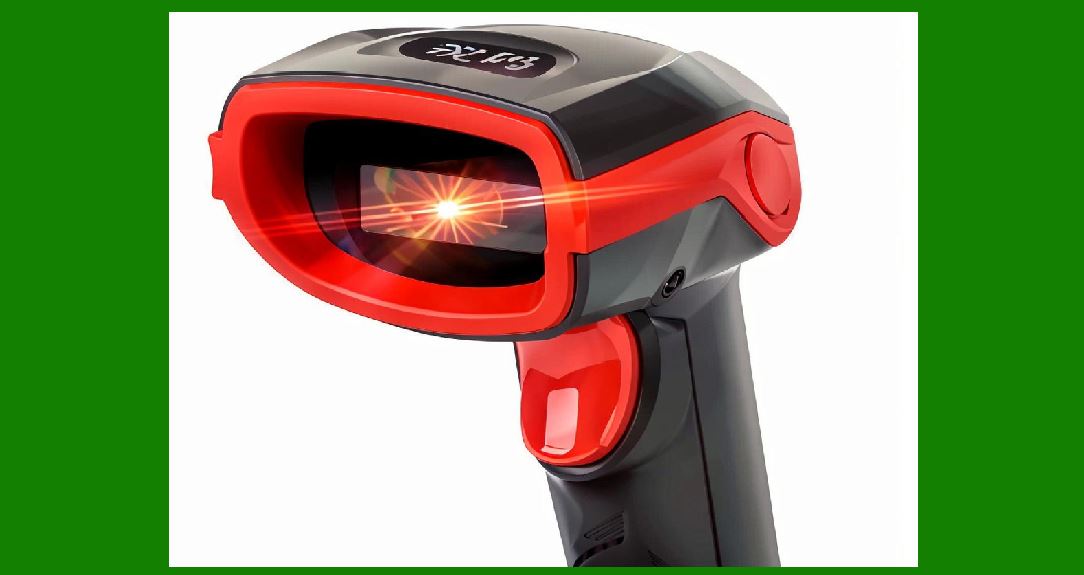
The physical design of retail scanners reflects this reality. Many handheld CCD scanners have a pistol-grip form factor with a window at the front that is designed to be brought into contact with or very close to the product. Some models include a rubberized bumper around the window to protect both the scanner and the product during contact. The trigger is positioned for easy activation with the index finger, and the overall balance of the device encourages a natural sweeping motion from product to product. |
In self-checkout lanes, the same principles apply. The customer brings the product to the scanner, often touching the barcode to the scanner window. The narrow depth of field ensures that only the intended product is scanned, reducing the risk of misreads that could lead to pricing errors or security issues. |

|
6. Healthcare and Laboratory Applications |
The healthcare industry presents a different set of requirements for barcode scanning, but the depth of field constraint remains relevant. In hospitals, clinics, and laboratories, barcodes are used to track patients, specimens, medications, and equipment. The scanning environment is often constrained, with labels applied to small objects, curved surfaces, and items that are difficult to position. |
In specimen collection, for example, a phlebotomist may need to scan a barcode on a blood collection tube while the tube is held in one hand and the scanner in the other. The tube is small and curved, and the label may be wrapped around its circumference. A contact scanner with a narrow depth of field is actually well suited to this task because the operator can bring the scanner directly to the tube, ensuring optimal focus. |
Medication administration is another area where contact scanning is common. Nurses scan barcodes on medication packages and patient wristbands before administering drugs. The wristband, in particular, presents a challenging scanning surface because it is curved and may be wrinkled or partially obscured. A contact scanner allows the nurse to press the scanner against the wristband or bring it very close, ensuring a reliable read. |
In laboratory settings, barcodes are used to track samples through automated processing systems. While some of these systems use fixed-mount scanners with specialized optics, many benchtop workflows rely on handheld contact scanners. The narrow depth of field helps ensure that the correct tube or slide is scanned, reducing the risk of sample mix-ups. |
The healthcare industry also illustrates an important limitation of contact scanning: infection control. Every time a scanner touches a patient, a specimen, or a medication package, there is a potential for cross-contamination. This has led to the development of scanners with smooth, easily disinfected surfaces and, in some cases, to the use of non-contact scanning technologies in healthcare settings. However, the cost and complexity of these alternatives means that contact scanners remain widespread, and the depth of field constraint continues to shape healthcare workflows. |

|
7. Manufacturing and Production Line Applications |
Manufacturing environments present some of the most demanding requirements for barcode scanning. Parts, components, and finished goods must be tracked through complex production processes, and labels may be applied to a wide variety of surfaces and materials. The depth of field constraint of CCD scanners interacts with these requirements in interesting ways. |
On assembly lines, fixed-mount CCD scanners are often used to read barcodes on passing products. These scanners are positioned at a fixed distance from the conveyor belt, and the depth of field is selected to match the expected range of product heights. If all products on the line have similar dimensions, a fixed-focus scanner with a narrow depth of field can work well. The scanner is positioned so that the barcode passes through the optimal focus zone, and the depth of field provides enough tolerance to accommodate minor variations in product position. |
However, when product sizes vary significantly, the narrow depth of field of a fixed-focus CCD scanner becomes a limitation. In these cases, manufacturers may use autofocus scanners, laser scanners with larger depth of field, or multiple scanners positioned at different distances. The choice depends on the specific requirements of the application and the tradeoffs between cost, speed, and reliability. |
Handheld CCD scanners are also common in manufacturing for tasks such as inventory tracking, work-in-progress tracking, and quality control. In these applications, the contact paradigm often applies. The operator brings the scanner to the label, whether it is on a part, a bin, or a documentation package. The narrow depth of field ensures that only the intended label is read, and the contact or near-contact operation provides a stable reading condition. |
Manufacturing environments also highlight the importance of scanner durability. A scanner that is used in a production setting may be dropped, bumped against machinery, or exposed to dust, moisture, and temperature extremes. The fixed-focus design of most CCD scanners contributes to durability by eliminating moving optical components that could be damaged or misaligned. |

|
8. Logistics and Warehouse Operations |
The logistics and warehouse sector represents one of the largest markets for barcode scanners, and it is also a sector where the depth of field constraint has significant practical implications. In a typical warehouse, workers scan barcodes on packages, pallets, shelves, and documents throughout the day. The scanning distances vary widely, from close-up reading of small labels to long-range scanning of pallet labels high on a rack. |
For close-range scanning tasks, such as reading labels on individual items or documents, contact CCD scanners are often used. The operator brings the scanner to the label, and the narrow depth of field ensures a reliable read. These scanners are typically lightweight and ergonomic, designed for comfortable use over long shifts. |
For longer-range tasks, such as reading pallet labels from several feet away, CCD scanners with their narrow depth of field are not suitable. Instead, laser scanners or imager-based scanners with longer focal lengths and larger depth of field are used. These devices can read labels at distances of several feet or more, allowing workers to scan without climbing or reaching. |
The distinction between these two classes of scanners is largely a distinction in depth of field. A contact CCD scanner might have a depth of field of less than an inch, while a long-range laser scanner might have a depth of field of several feet. The choice between them depends on the specific scanning tasks in the warehouse and the distances at which labels are typically presented. |
Many warehouses use a combination of scanner types, deploying contact CCD scanners for close-range tasks and long-range scanners for tasks that require reading from a distance. This mixed approach allows organizations to optimize for both cost and capability, using the simpler, less expensive contact scanners where they are sufficient and reserving the more capable long-range scanners for tasks that truly require them. |

|
9. Field Service and Mobile Applications |
Field service workers, delivery personnel, and mobile professionals present a unique set of scanning requirements. These workers are often on the move, scanning barcodes in environments that are not designed for scanning. They may need to read labels on equipment, packages, meters, or identification cards in outdoor conditions, in tight spaces, or at awkward angles. |
The depth of field constraint of CCD scanners affects these applications in several ways. First, the need to bring the scanner into contact with or very close to the label can be inconvenient or even impossible in some field conditions. A delivery driver scanning a package on a doorstep, for example, must bring the scanner close to the label, which may require setting down other items or adjusting the package position. |
Second, field conditions often involve variable lighting, which can interact with the narrow depth of field to make scanning more difficult. Bright sunlight can wash out the scanner's illumination, while low light can reduce contrast. The contact scanning paradigm helps mitigate these effects by bringing the scanner close to the label and excluding ambient light, but it does not eliminate the challenges entirely. |
Mobile computing devices with integrated scanners have become increasingly common in field service applications. These devices often use CCD or CMOS imagers with fixed-focus optics, inheriting the same depth of field constraints as dedicated scanners. The integration of scanning into smartphones and tablets has extended the reach of barcode technology, but it has not eliminated the fundamental optical limitations. |
Some field service applications have adopted two-dimensional imagers with autofocus or extended depth of field capabilities. These devices can read barcodes from a wider range of distances, making them more versatile in field conditions. However, they are typically more expensive and may consume more power than fixed-focus CCD scanners, which limits their adoption in cost-sensitive applications. |
|
10. The Tradeoff Between Depth of Field and Other Performance Parameters |
The depth of field of a CCD scanner is not an isolated parameter. It interacts with other aspects of scanner performance in ways that shape the overall design and capability of the device. Understanding these tradeoffs is essential for anyone specifying or designing barcode scanning systems. |
One key tradeoff is between depth of field and light gathering. A larger aperture increases light gathering, which improves performance in low-light conditions and allows for shorter exposure times. However, a larger aperture also reduces depth of field, making the scanner more sensitive to variations in scanning distance. Designers must balance these competing requirements, often choosing a moderate aperture that provides adequate light gathering while maintaining a usable depth of field. |
Another tradeoff is between depth of field and resolution. A longer focal length can provide greater magnification and higher resolution for small or dense barcodes, but it also reduces depth of field. This is why scanners designed for reading very small barcodes, such as those used in electronics manufacturing, often have very narrow depth of field and must be used in close contact with the label. |
Field of view is another consideration. A wider field of view allows the scanner to capture more of the scene, making it easier to position the barcode within the scan area. However, a wider field of view typically requires a shorter focal length, which can affect depth of field and resolution. Designers must balance the need for easy aiming against the need for adequate depth of field and resolution. |
These tradeoffs are not unique to CCD scanners. They apply to all optical scanning systems, including laser scanners and imager-based scanners. However, the specific balance point chosen for a given scanner depends on its intended application. A retail contact scanner might prioritize ease of use and cost, accepting a narrow depth of field in exchange for simplicity and affordability. A long-range industrial scanner might prioritize depth of field and resolution, accepting higher cost and complexity. |
|
11. Case Study: Retail Checkout at Scale |
To illustrate how depth of field constraints shape real-world deployments, consider the example of a large retail chain deploying barcode scanners across thousands of stores. The chain has a mix of store formats, from small convenience stores to large supermarkets, and a mix of checkout configurations, from staffed lanes to self-checkout stations. |
For staffed checkout lanes, the chain selects handheld CCD scanners with fixed-focus optics and a depth of field of approximately half an inch. These scanners are inexpensive, durable, and well suited to the close-range scanning that dominates checkout workflows. The narrow depth of field is not a limitation because the operator brings each product to the scanner, and the scanner is designed to be used in contact or near-contact mode. |
For self-checkout stations, the chain uses a different configuration. The scanners are mounted in a fixed position, and customers bring products to the scanning area. The depth of field is selected to match the range of product positions that customers are likely to present, which may be somewhat larger than the range in staffed lanes. However, the depth of field is still relatively narrow, and the scanning area is designed to guide customers to position products at the correct distance. |
For both configurations, the depth of field constraint is a design assumption rather than a limitation. The scanners are selected and positioned to work within their depth of field, and the workflows are designed around the capabilities of the devices. The result is a system that is reliable, cost-effective, and well matched to the task. |
This case study illustrates a broader principle: the depth of field constraint of CCD scanners is not a problem to be solved but a characteristic to be designed around. Manufacturers, integrators, and end users have developed workflows, form factors, and deployment patterns that accommodate the narrow depth of field of fixed-focus CCD scanners. The result is a technology ecosystem that is remarkably well adapted to its constraints. |

|
12. Case Study: Healthcare Specimen Tracking |
In a hospital laboratory, thousands of specimens are processed every day. Each specimen tube carries a barcode that identifies the patient, the test ordered, and other relevant information. The barcodes must be scanned at multiple points in the workflow, from collection to analysis to reporting. |
The laboratory uses handheld CCD scanners with fixed-focus optics for specimen tracking. The scanners are selected for their reliability, ease of disinfection, and cost. The narrow depth of field is well suited to the task because specimen tubes are small and easily brought into contact with the scanner. |
However, the laboratory also faces challenges related to the depth of field constraint. Tubes of different sizes and shapes are used for different tests, and the barcode labels may be positioned at different heights on the tubes. The scanner must be able to read labels across this range of positions, which requires the operator to adjust the scanning distance accordingly. |
To address this challenge, the laboratory has standardized on a limited set of tube types and label positions. This standardization reduces the variability that the scanner must accommodate and allows the operators to develop consistent scanning habits. The depth of field constraint is managed through workflow design and standardization rather than through changes to the scanner itself. |
This case study illustrates how the depth of field constraint interacts with workflow design. In environments where variability is high, the constraint can be a significant challenge. In environments where standardization is possible, the constraint can be managed effectively. The key is to understand the constraint and design workflows that accommodate it. |

|
13. Case Study: Manufacturing Work-in-Progress Tracking |
A manufacturer of electronic assemblies uses barcode scanning to track work-in-progress through a complex production process. Each assembly carries a barcode that identifies its configuration, its production status, and its test results. The barcodes are scanned at each station along the production line. |
The manufacturer uses fixed-mount CCD scanners at each station. The scanners are positioned at a fixed distance from the conveyor, and the depth of field is selected to match the height of the assemblies as they pass. Because the assemblies are uniform in size, the depth of field requirement is modest, and a fixed-focus scanner with a narrow depth of field works well. |
However, the manufacturer also uses handheld CCD scanners for tasks that cannot be automated, such as rework and inspection. These scanners are contact devices, and the operators bring them to the barcode on each assembly. The narrow depth of field ensures that only the intended barcode is read, reducing the risk of errors. |
The manufacturer has found that the depth of field constraint is actually beneficial in this application. Because the scanners only read barcodes within a narrow range of distances, there is less risk of accidentally scanning a nearby barcode or a label on a different assembly. This improves accuracy and reduces the need for manual verification. |
This case study illustrates that the depth of field constraint can be a feature rather than a bug in certain applications. By limiting the range of distances over which a scanner can read, the constraint provides a form of spatial selectivity that can improve accuracy and reduce errors. Designers and integrators can leverage this characteristic to create scanning systems that are more reliable and easier to use. |
|
14. Case Study: Warehouse Receiving and Putaway |
In a distribution center, receiving and putaway are critical processes that depend on accurate barcode scanning. When trucks arrive with pallets of goods, workers must scan the pallet labels and the individual carton labels to confirm receipt and direct the goods to the correct storage locations. |
The distribution center uses a combination of scanner types for these tasks. For pallet labels, which are often positioned high on the pallet or on the side facing the worker, long-range scanners with large depth of field are used. These scanners can read labels from several feet away, allowing workers to scan without climbing or reaching. |
For carton labels, which are smaller and more accessible, contact CCD scanners are used. Workers bring the scanner to each carton, and the narrow depth of field ensures a reliable read. The contact operation also provides a physical confirmation that the correct carton has been scanned, which is important for accuracy. |
The distribution center has found that the depth of field constraint of the contact scanners is well suited to the carton scanning task. Because the workers are already handling the cartons, bringing the scanner into contact is a natural part of the workflow. The narrow depth of field does not slow down the process, and the reliability of the contact scanning is high. |
This case study illustrates how different scanner types with different depth of field characteristics are deployed together to address the full range of scanning tasks in a warehouse environment. The contact CCD scanner, with its narrow depth of field, is the right tool for close-range tasks, while the long-range scanner is the right tool for tasks that require reading from a distance. The key is to match the scanner to the task. |

|
15. The Future of Depth of Field in CCD Scanning |
The depth of field constraint of CCD scanners is rooted in fundamental optics, but that does not mean it is immutable. Advances in technology are gradually expanding the capabilities of CCD and CMOS scanners, and these advances may eventually reduce the dominance of the contact scanning paradigm. |
One promising development is the use of computational imaging techniques to extend depth of field. By capturing multiple images at different focus distances and combining them, or by using specialized optical elements that encode depth information, it is possible to create scanners that maintain focus over a wider range of distances. These techniques are already used in some smartphone cameras and may eventually be applied to barcode scanners. |
Another development is the use of liquid lens technology, which uses a small droplet of liquid whose shape can be changed electronically to adjust focus. Liquid lenses can focus quickly and reliably, and they eliminate the mechanical complexity of traditional autofocus systems. Some barcode scanners already use liquid lens technology to provide autofocus capability in a compact, durable package. |
Improved sensor resolution and processing power also contribute to extended depth of field. As sensors become more sensitive and processors become faster, it becomes possible to decode barcodes from images that are somewhat blurred, effectively extending the usable depth of field without changing the optics. This approach is already used in some image-based scanners, which can read barcodes that would be too blurred for older CCD scanners. |
Despite these advances, the fixed-focus CCD scanner with its narrow depth of field is likely to remain dominant for many years to come. The cost, simplicity, and reliability of the fixed-focus design are compelling advantages that are difficult to overcome. For the many applications where close-range scanning is the norm, the narrow depth of field is not a limitation but a well-matched characteristic. |

|
16. Designing Around the Constraint: Lessons for System Integrators |
For system integrators and solution designers, the depth of field constraint of CCD scanners is not just a technical detail. It is a design parameter that must be considered at every stage of system design, from scanner selection to workflow design to operator training. |
The first lesson is to match the scanner to the task. If the application involves close-range scanning of labels that are easily brought into contact with the scanner, a fixed-focus CCD scanner with a narrow depth of field is an excellent choice. If the application requires scanning from a distance, a different scanner type with a larger depth of field should be selected. |
The second lesson is to design workflows that accommodate the constraint. This may involve positioning labels at a consistent height, providing physical guides or stops that help operators position the scanner correctly, or training operators to bring the scanner into contact with the label. Workflow design can often compensate for the narrow depth of field more effectively than any technical solution. |
The third lesson is to consider the interaction between depth of field and other system components. The scanner's field of view, resolution, and illumination all interact with the depth of field to determine overall performance. A holistic approach to system design, considering all of these factors together, is more likely to produce a successful outcome than a piecemeal approach. |
The fourth lesson is to test in the real environment. Depth of field performance can vary depending on ambient light, label quality, surface characteristics, and operator behavior. Testing the scanner in the actual deployment environment, with actual labels and actual operators, is essential to ensure that the depth of field constraint is properly managed. |
|
17. Detailed Summary |
This chapter has examined the depth of field constraint of CCD scanners and its profound influence on the design and application of barcode scanning systems. The key points can be summarized as follows: |
The depth of field of a CCD scanner is determined by the lens aperture and focal length. A typical fixed-focus design, which dominates the CCD scanner market, yields a usable range of less than one inch. This narrow depth of field is the fundamental reason why CCD scanners are often contact devices, requiring the operator to bring the scanner into close proximity with the label. |
The fixed-focus design dominates because it offers compelling advantages in cost, simplicity, reliability, and speed. Autofocus mechanisms add complexity, cost, and delay, which are undesirable in the high-throughput, cost-sensitive applications where CCD scanners are most commonly used. The narrow depth of field of fixed-focus designs is well matched to close-range scanning tasks, which represent the majority of CCD scanner applications. |
The contact scanning paradigm is a direct response to the depth of field constraint. Physical contact provides a stable reference point, helps with alignment, and reduces the effects of ambient light. Scanner designs incorporate features such as rubber bumpers, transparent windows, and ergonomic shapes that facilitate contact operation. |

|
Real-world applications across multiple industries illustrate how the depth of field constraint shapes scanning workflows. In retail point-of-sale, contact scanners are well suited to the close-range scanning of products presented at the checkout counter. In healthcare, contact scanners are used for specimen tracking and medication administration, where labels are small and easily brought into contact. In manufacturing, fixed-mount scanners with narrow depth of field are used for assembly line tracking, while handheld contact scanners are used for rework and inspection. In logistics and warehousing, contact scanners handle close-range carton scanning, while long-range scanners handle pallet labels. In field service, the contact paradigm can be inconvenient, and alternative scanner types with larger depth of field are sometimes used. |
The depth of field constraint interacts with other performance parameters, including light gathering, resolution, and field of view. Designers must balance these competing requirements to achieve the optimal performance for a given application. |
Case studies from retail, healthcare, manufacturing, and warehousing illustrate how organizations design around the depth of field constraint. Standardization of label positions, workflow design, and operator training are all effective strategies for managing the constraint. In some cases, the narrow depth of field is actually beneficial, providing spatial selectivity that reduces the risk of accidental scans. |
The future of depth of field in CCD scanning may be shaped by computational imaging, liquid lens technology, and improved sensor and processing capabilities. However, the fixed-focus CCD scanner with its narrow depth of field is likely to remain dominant for many years, because its cost, simplicity, and reliability are compelling advantages that are difficult to overcome. |
For system integrators and solution designers, the depth of field constraint is a design parameter that must be considered at every stage of system design. Matching the scanner to the task, designing workflows that accommodate the constraint, considering interactions with other system components, and testing in the real environment are all essential practices for successful deployment. |
|
In conclusion, the depth of field constraint of CCD scanners is a fundamental optical limitation that has shaped an entire category of devices and the workflows of the industries that use them. Understanding this constraint is essential for anyone who specifies, deploys, or designs barcode scanning systems. The constraint is not a problem to be solved but a characteristic to be designed around, and the organizations that understand it best are the ones that achieve the most reliable and efficient scanning operations. |
 cs@easiersoft.com