1. Introduction to Guangzhou Niceway Electronic Technology Co., Ltd. |
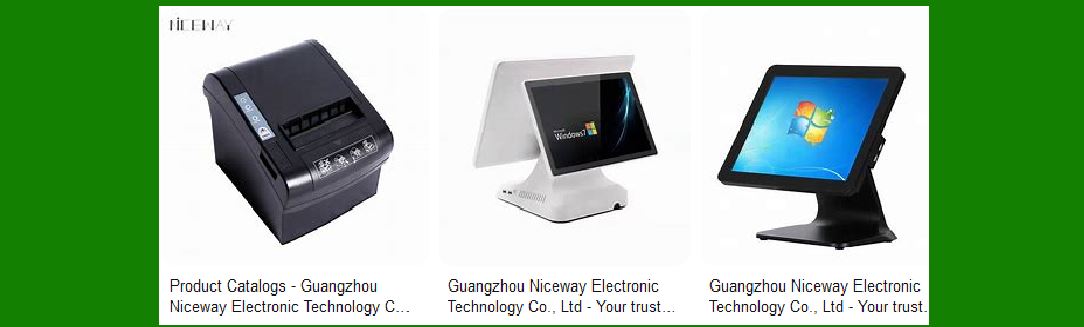
Guangzhou Niceway Electronic Technology Co., Ltd. is a reputable manufacturer specializing in the design, development, production, and sales of various electronic products, including POS terminals, thermal printers, and barcode scanners. The company has established a strong presence in over 30 countries, particularly in Europe, North America, South America, and Southeast Asia. |
|
2. Product Range and Specialization |
Niceway offers a diverse range of barcode scanners designed to meet various industry needs. Their product lineup includes handheld barcode scanners, fixed-mount scanners, and industrial-grade scanners. These devices are engineered to provide high performance, reliability, and ease of use in different environments. |

|
3. Handheld Barcode Scanners |
Handheld barcode scanners from Niceway are designed for versatility and ease of use. They are suitable for retail, logistics, and warehouse management. Key features include: |
Ergonomic Design: Comfortable grip for prolonged use. High-Speed Scanning: Capable of reading 1D and 2D barcodes quickly and accurately. Connectivity Options: Available in wired (USB) and wireless (Bluetooth) versions. Durability: Built to withstand drops and rough handling3. |

|
4. Fixed-Mount Barcode Scanners |
Fixed-mount scanners are ideal for automated scanning applications such as production lines and kiosks. Features include: |
Compact Size: Easy to integrate into various systems. High Precision: Accurate scanning of barcodes at different angles and distances. Versatile Mounting Options: Can be mounted on walls, counters, or embedded in machines. |
5. Industrial-Grade Barcode Scanners |
These scanners are designed for harsh environments such as manufacturing plants and outdoor settings. They offer: |
Rugged Construction: Resistant to dust, water, and extreme temperatures. Long-Range Scanning: Capable of reading barcodes from a distance. Advanced Decoding Capabilities: Efficiently reads damaged or poorly printed barcodes. |

|
6. Technological Innovations |
Niceway integrates advanced technologies into their barcode scanners to enhance performance and user experience: |
Image Recognition: High-resolution sensors for accurate image capture and barcode decoding. AI Algorithms: Improved scanning speed and accuracy through artificial intelligence. Multi-Interface Support: Compatibility with various systems and devices through USB, RS232, and Bluetooth. |
7. Customization and OEM/ODM Services |
Niceway offers customization options to meet specific customer requirements. They provide OEM (Original Equipment Manufacturer) and ODM (Original Design Manufacturer) services, allowing clients to tailor the design, functionality, and branding of barcode scanners to their needs. |

|
8. Quality Assurance and Certifications |
Quality is a top priority for Niceway. Their barcode scanners undergo rigorous testing to ensure reliability and performance. The company holds various certifications, including ISO9001, CE, and RoHS, which attest to their commitment to quality and compliance with international standards. |
9. Applications of Niceway Barcode Scanners |
Niceway barcode scanners are used in a wide range of industries and applications: |
Retail: Streamlining checkout processes and inventory management. Logistics: Enhancing tracking and management of goods in transit. Healthcare: Improving patient identification and medication tracking. Manufacturing: Automating production line processes and quality control. |

|
10. Customer Support and After-Sales Service |
Niceway provides comprehensive customer support and after-sales service. They offer technical assistance, troubleshooting, and maintenance services to ensure the longevity and optimal performance of their barcode scanners. |
11. Case Studies and Success Stories |
Niceway has numerous success stories from clients who have implemented their barcode scanners. These case studies highlight the efficiency, reliability, and cost-effectiveness of Niceway’s products in real-world applications. |

|
12. Future Developments and Innovations |
Niceway continues to invest in research and development to stay at the forefront of barcode scanning technology. Future developments may include: |
Enhanced AI Capabilities: Further integration of AI to improve scanning accuracy and speed. IoT Integration: Connecting barcode scanners to the Internet of Things (IoT) for smarter data management. Sustainability Initiatives: Developing eco-friendly products and manufacturing processes. |

|
13. Conclusion |
Guangzhou Niceway Electronic Technology Co., Ltd. is a leading provider of barcode scanners, offering a wide range of products designed to meet the diverse needs of various industries. Their commitment to quality, innovation, and customer satisfaction makes them a trusted partner for businesses worldwide. |
 cs@easiersoft.com