1. Introduction to Cognex Corporation |
Cognex Corporation is a leading provider of industrial barcode readers and machine vision systems. Founded in 1981, the company has established itself as a pioneer in the field of machine vision technology. Cognex barcode scanners are known for their high performance, reliability, and advanced technology, making them a preferred choice in various industries, including manufacturing, logistics, and retail. |
|
2. Types of Barcode Scanners |
Cognex offers a wide range of barcode scanners to meet different application needs. These include: |
2.1 Fixed-Mount Barcode Scanners |
Fixed-mount barcode scanners are designed for high-speed, high-volume scanning applications. They are typically used in manufacturing lines, distribution centers, and warehouses. Key models include: |
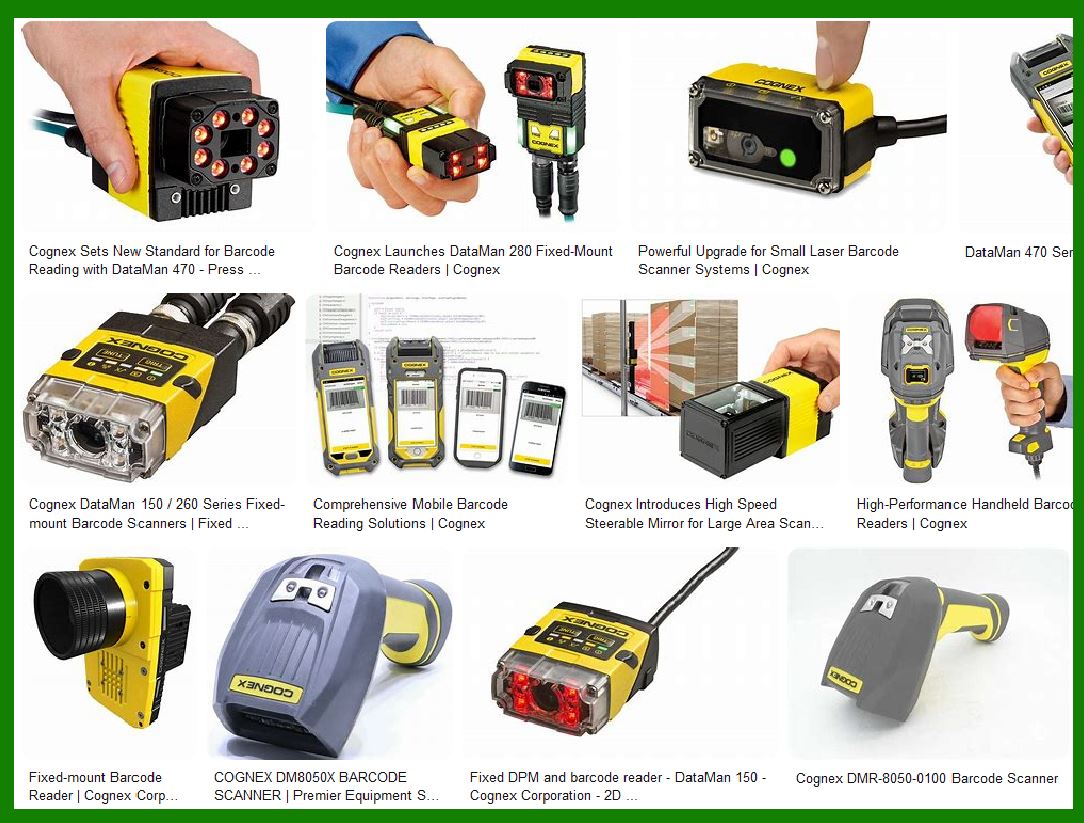
DataMan 470 Series: Known for its multi-core processing power, high-resolution sensor, and advanced decoding algorithms, the DataMan 470 series is ideal for complex, high-throughput applications1. DataMan 370 Series: Offers robust performance with advanced image formation and decoding technology. DataMan 150/260 Series: Compact and versatile, suitable for various industrial applications. |
2.2 Handheld Barcode Scanners |
Handheld barcode scanners are portable and can be used in various environments, from retail to industrial settings. They are available in both corded and wireless versions. Key models include: |
DataMan 8050 Series: Rugged and durable, designed for industrial environments. DataMan 8700 Series: Offers superior read performance and ease of use, with wireless connectivity options. |
2.3 Mobile Barcode Scanners |
Mobile barcode scanners are designed for flexibility and mobility. They are often used in retail and warehouse environments where operators need to move around frequently. Key models include: |
MX-1502 Series: Combines the power of a mobile computer with the performance of a fixed-mount scanner. MX-1000 Series: Offers a rugged design and advanced scanning capabilities. |
2.4 Wearable Barcode Scanners |
Wearable barcode scanners are designed for hands-free operation, increasing efficiency and productivity in environments where operators need to use both hands. Key models include: |
DataMan 8700 Series: Can be mounted on a wrist or finger for easy access and use. |

|
3. Key Features and Technologies |
Cognex barcode scanners are equipped with advanced features and technologies that enhance their performance and reliability. Some of the key features include: |
3.1 Image-Based Scanning |
Unlike traditional laser scanners, Cognex barcode readers use image-based technology to capture and decode barcodes. This allows them to read a wide range of barcode types, including 1D and 2D codes, and handle damaged or poorly printed codes with ease. |
3.2 Advanced Decoding Algorithms |
Cognex scanners are equipped with advanced decoding algorithms, such as 1DMax+? and 2DMax+?, which ensure high read rates even in challenging conditions. These algorithms can handle variations in code quality, orientation, and contrast. |
3.3 High-Resolution Sensors |
High-resolution sensors enable Cognex scanners to capture detailed images of barcodes, improving their ability to read small or densely packed codes. This is particularly useful in applications where space is limited or codes are printed at high densities. |
3.4 Modular Design |
Many Cognex barcode scanners feature a modular design, allowing users to customize and configure the scanner to meet their specific needs. This includes options for different lenses, lighting, and communication interfaces. |
3.5 Rugged Construction |
Cognex barcode scanners are built to withstand harsh industrial environments. They are designed to be durable and resistant to dust, water, and impact, ensuring reliable performance in challenging conditions. |

|
4. Applications of Cognex Barcode Scanners |
Cognex barcode scanners are used in a wide range of applications across various industries. Some of the key applications include: |
4.1 Manufacturing |
In manufacturing, Cognex barcode scanners are used for tracking parts and components, verifying product authenticity, and managing inventory. They help improve efficiency and accuracy in production processes. |
4.2 Logistics and Distribution |
In logistics and distribution centers, Cognex scanners are used for sorting and tracking packages, managing inventory, and ensuring accurate and timely delivery of goods. They help streamline operations and reduce errors. |
4.3 Retail |
In retail environments, Cognex handheld and mobile barcode scanners are used for point-of-sale (POS) transactions, inventory management, and customer service. They help improve the shopping experience and increase operational efficiency. |
4.4 Healthcare |
In healthcare, Cognex barcode scanners are used for tracking medical supplies, managing patient records, and ensuring the accuracy of medication administration. They help improve patient safety and streamline healthcare operations. |

|
5. Integration and Compatibility |
Cognex barcode scanners are designed to be easily integrated with various systems and devices. They support a wide range of communication protocols and interfaces, including Ethernet, USB, RS-232, and wireless connectivity. This ensures compatibility with different types of equipment and software systems. |

|
6. Software and Tools |
Cognex provides a range of software and tools to support the configuration, management, and optimization of their barcode scanners. Some of the key software offerings include: |
6.1 DataMan Setup Tool |
The DataMan Setup Tool is a user-friendly software application that allows users to configure and manage their Cognex barcode scanners. It provides a graphical interface for setting up the scanner, adjusting parameters, and monitoring performance. |
6.2 Cognex Explorer |
Cognex Explorer is a powerful software platform that provides centralized management and monitoring of Cognex devices. It allows users to view and manage multiple scanners, update firmware, and analyze performance data. |
6.3 VisionPro |
VisionPro is a comprehensive machine vision software platform that supports the development and deployment of vision applications. It includes a range of tools and libraries for image processing, analysis, and inspection. |

|
7. Support and Services |
Cognex offers a range of support and services to help customers get the most out of their barcode scanners. This includes technical support, training, and consulting services. Cognex also provides a comprehensive online knowledge base and community forum where users can find answers to common questions and share best practices. |

|
8. Conclusion |
Cognex Corporation is a leading provider of industrial barcode scanners, offering a wide range of products to meet the needs of various industries. Their barcode scanners are known for their high performance, reliability, and advanced technology. With features such as image-based scanning, advanced decoding algorithms, and rugged construction, Cognex barcode scanners provide a reliable and efficient solution for a wide range of applications. |
 cs@easiersoft.com