1. Introduction to SEIKO EPSON Barcode Label Printers |
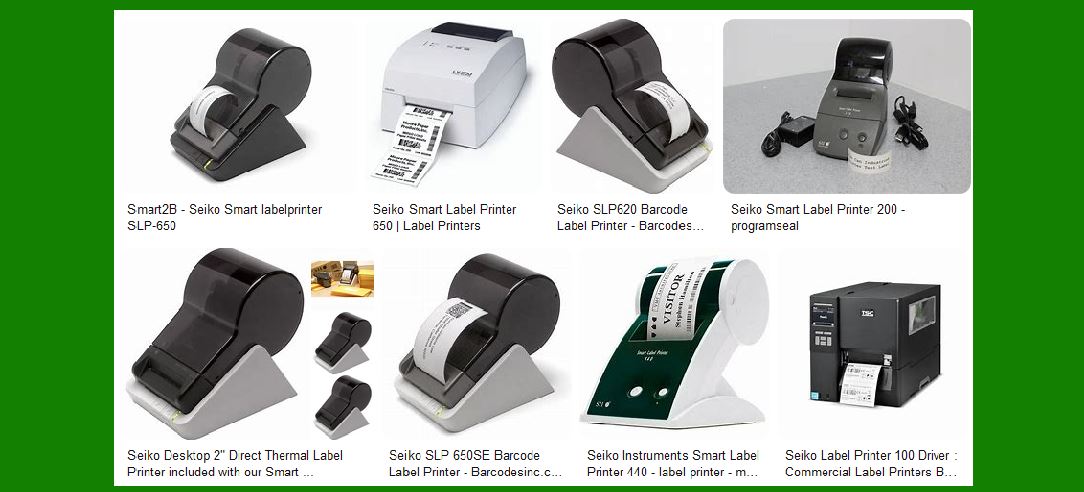
SEIKO EPSON is a renowned manufacturer of barcode label printers, known for their reliability, efficiency, and advanced technology. These printers are widely used in various industries, including retail, logistics, healthcare, and manufacturing, for printing labels, barcodes, and receipts. SEIKO EPSON offers a range of models to cater to different needs, from compact desktop printers to robust industrial printers. |
|
2. Key Features of SEIKO EPSON Barcode Label Printers |
SEIKO EPSON barcode label printers are equipped with several key features that make them stand out in the market: |
High-Resolution Printing: Most models offer high-resolution printing capabilities, ensuring that barcodes and labels are clear and easy to read. Fast Printing Speed: These printers are designed to handle high-volume printing tasks with impressive speed, which is crucial for businesses that require quick turnaround times. Durability and Reliability: Built with robust materials, SEIKO EPSON printers are durable and can withstand harsh environments, making them ideal for industrial use. Versatile Media Handling: They support a wide range of media types and sizes, including continuous labels, die-cut labels, and tags. User-Friendly Interface: Many models come with intuitive interfaces and easy-to-use software, allowing users to design and print labels with minimal effort. |

|
3. Popular Models of SEIKO EPSON Barcode Label Printers |
Here are some of the popular models of SEIKO EPSON barcode label printers: |
3.1 SEIKO EPSON TM-L90 |
Overview: The TM-L90 is a versatile thermal label printer that offers high-speed printing and supports various media types. Key Features: Printing Speed: Up to 150 mm/sec Resolution: 203 dpi Media Width: 38 mm to 80 mm Connectivity: USB, Serial, Ethernet Applications: Ideal for retail, healthcare, and logistics. |
3.2 SEIKO EPSON ColorWorks C7500 |
Overview: The ColorWorks C7500 is designed for high-volume, on-demand color label printing. Key Features: Printing Speed: Up to 300 mm/sec Resolution: 600 x 1200 dpi Media Width: 50 mm to 112 mm Connectivity: USB, Ethernet Applications: Suitable for manufacturing, retail, and logistics. |
3.3 SEIKO EPSON TM-C3500 |
Overview: The TM-C3500 is a compact color label printer that offers high-quality printing for small to medium-sized businesses. Key Features: Printing Speed: Up to 103 mm/sec Resolution: 720 x 360 dpi Media Width: 30 mm to 112 mm Connectivity: USB, Ethernet Applications: Perfect for retail, healthcare, and office environments. |

|
4. Advanced Technologies in SEIKO EPSON Barcode Label Printers |
SEIKO EPSON incorporates several advanced technologies in their barcode label printers to enhance performance and user experience: |
PrecisionCore Technology: This technology ensures high-quality printing with precise control over ink droplets, resulting in sharp and clear labels. Auto-Cutter: Many models come with an auto-cutter feature that automatically cuts the labels after printing, improving efficiency and reducing manual labor. Peel-and-Present: This feature allows the printer to peel the label from the backing paper and present it to the user, making it easier to apply the labels quickly. Remote Management: SEIKO EPSON printers can be managed remotely through network connectivity, allowing businesses to monitor and control multiple printers from a central location. |

|
5. Software and Integration |
SEIKO EPSON provides comprehensive software solutions and integration options to enhance the functionality of their barcode label printers: |
Label Design Software: SEIKO EPSON offers user-friendly label design software that allows users to create custom labels with text, graphics, and barcodes. Driver Support: The printers come with drivers for various operating systems, including Windows, Mac, and Linux, ensuring compatibility with different platforms. SDKs and APIs: For businesses that require custom integration, SEIKO EPSON provides Software Development Kits (SDKs) and Application Programming Interfaces (APIs) to facilitate seamless integration with existing systems. |

|
6. Applications of SEIKO EPSON Barcode Label Printers |
SEIKO EPSON barcode label printers are used in a wide range of applications across different industries: |
Retail: For printing price tags, shelf labels, and promotional labels. Logistics: For printing shipping labels, tracking labels, and inventory labels. Healthcare: For printing patient wristbands, prescription labels, and laboratory labels. Manufacturing: For printing product labels, compliance labels, and asset tags. |

|
7. Maintenance and Support |
SEIKO EPSON provides excellent maintenance and support services to ensure the longevity and optimal performance of their barcode label printers: |
Regular Maintenance: Routine maintenance, such as cleaning the print head and replacing worn-out parts, is essential to keep the printers in good working condition. Technical Support: SEIKO EPSON offers technical support through various channels, including phone, email, and online resources, to assist users with any issues they may encounter. Warranty and Service Plans: The printers come with a standard warranty, and users can also opt for extended service plans for additional coverage and peace of mind. |

|
8. Environmental Considerations |
SEIKO EPSON is committed to sustainability and environmental responsibility. Their barcode label printers are designed with eco-friendly features: |
Energy Efficiency: The printers are designed to consume less power, reducing their environmental impact. Recyclable Materials: SEIKO EPSON uses recyclable materials in the construction of their printers, contributing to waste reduction. Eco-Friendly Consumables: The printers are compatible with eco-friendly label materials and inks, further minimizing their environmental footprint. |

|
9. Conclusion |
SEIKO EPSON barcode label printers are a reliable and efficient solution for businesses that require high-quality label printing. With their advanced features, versatile applications, and commitment to sustainability, SEIKO EPSON printers are an excellent choice for various industries. Whether you need a compact desktop printer for your retail store or a robust industrial printer for your manufacturing facility, SEIKO EPSON has a model that will meet your needs. |
 cs@easiersoft.com